Test Reports & Run Results
Gherkio produces structured output in two forms: console output (immediate, ephemeral) and saved reports (persistent, shareable).
Console Output
When you run gherkio run, each step is printed to stdout with its result:
✓ POST https://dummyjson.com/auth/login
✓ status = 200
✓ body.exists = true
✓ body.username = emilys
Duration: 312ms
✓ GET https://dummyjson.com/users/1
✓ status = 200
✓ body.id = 1
Duration: 89ms
✓ PASS
2 passed, 0 failed, 2 total
Duration: 401ms
```text
### Pass/Fail Indicators
| Symbol | Meaning |
|--------|---------|
| `✓` | Step or assertion passed |
| `✗` | Step or assertion failed |
| `→` | Redirected (HTTP 3xx) |
### Failure Output
When a step fails, Gherkio prints the failed assertion details plus the full response:
```text
✗ POST https://petstore.swagger.io/v2/pet/1
✗ status = 200 (expected), got 404
✗ body.id exists (path not found)
Available fields:
- message
- statusCode
Response:
Status: 404
Body:
{
"message": "Pet not found"
}
```text
Gherkio also extracts available JSON fields when a path is not found, so you can quickly correct your assertion path.
### Verbose Output
Use `--verbose` to show full request and response bodies:
```bash
gherkio run tests/login.yaml --verbose
```text
Sensitive fields (password, token, secret, creditCard, etc.) are always masked in console output.
---
## Saved Reports
Reports are generated only when you add the `--report` flag:
```bash
gherkio run tests/login.yaml --report html # HTML report
gherkio run tests/login.yaml --report json # JSON report
gherkio run tests/login.yaml --report html,json # Both formats
```text
### Report Directory Structure
Reports are saved under `.gherkio/reports/`:
```text
.gherkio/reports/
├── latest/ # most recent run (overwritten each time)
│ ├── report.html
│ └── report.json
├── 20260610_143052/ # timestamped copy
│ ├── report.html
│ └── report.json
└── failures/ # individual failed step snapshots
└── failure-<Scenario>-<StepName>-step<N>-<timestamp>.json
```text
The `latest/` directory is always overwritten with the most recent run. Timestamp directories preserve historical runs indefinitely (no automatic cleanup by default).
### HTML Report
The HTML report is a self-contained file with **no external dependencies** - all CSS and JavaScript are inlined. Open it in any browser.
**Example:** An actual HTML report from the petstore test suite looks like this (open `.gherkio/reports/latest/report.html` in your browser to explore it interactively):
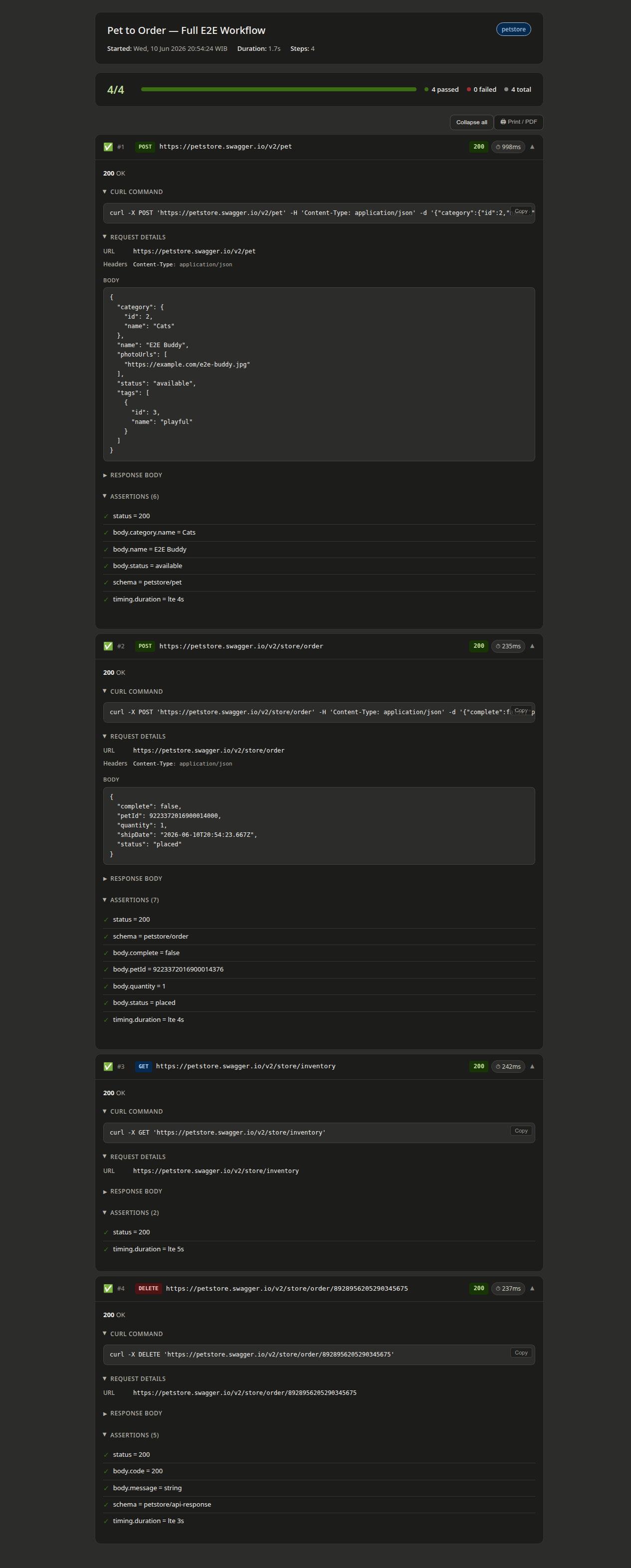
**Features:**
- Dark/light mode via CSS media query
- Expandable step sections (collapsed by default, failed steps auto-expand)
- Pass/fail badges per step with HTTP status code coloring
- Response time badge on each step (turns red if a timing.max assertion failed)
- Copyable cURL command per step (reproduce the exact request in your terminal)
- Copyable request ID badge (if the server returns x-request-id or similar headers)
- Expand All / Collapse All toolbar toggle
- Sensitive values masked automatically
### JSON Report
The JSON report is machine-readable and ideal for CI/CD pipelines, historical analysis, or custom dashboards.
**Report structure:**
```json
{
"metadata": {
"version": "1.0.0",
"timestamp": "2026-06-10T14:30:00Z",
"duration": 401,
"scenario": "login example",
"testFile": "tests/auth/login.yaml",
"environment": "local"
},
"summary": {
"total": 2,
"passed": 2,
"failed": 0,
"passedPercent": 100
},
"steps": [
{
"index": 0,
"label": "POST https://dummyjson.com/auth/login",
"duration": 312,
"durationLabel": "312ms",
"passed": true,
"curl": "curl -X POST 'https://dummyjson.com/auth/login' -H 'Content-Type: application/json' -d '{"username":"emilys","password":"***masked***"}'",
"request": {
"method": "POST",
"url": "https://dummyjson.com/auth/login",
"headers": { "Content-Type": "application/json" },
"body": { "username": "emilys", "password": "***masked***" }
},
"response": {
"status": 200,
"headers": { "Content-Type": "application/json", "x-request-id": "req_abc123" },
"body": { "accessToken": "***masked***", "username": "emilys", "id": 1 }
},
"requestId": "req_abc123",
"assertions": [
{ "path": "status", "expected": "200", "actual": "200", "passed": true },
{ "path": "body.accessToken", "expected": "exists", "actual": "***masked***", "passed": true }
]
}
],
"errors": []
}
```text
**Key fields per step:**
| Field | Description |
|-------|-------------|
| `duration` / `durationLabel` | Step duration in milliseconds and human-readable form |
| `curl` | Copy-pasteable cURL command with sensitive values masked |
| `requestId` | Tracing ID extracted from response headers (x-request-id, x-trace-id, request-id, etc.) |
| `assertions` | Each assertion with path, expected, actual, and pass/fail status |
### Raw Reports (Unmasked)
By default, sensitive values are masked in JSON reports. To generate an unmasked report:
```bash
gherkio run tests/login.yaml --report json --report-raw
```text
The `--report-raw` flag only affects JSON reports. HTML reports and cURL commands always mask sensitive values regardless of this flag.
### Failure Snapshots
When a step fails, Gherkio also saves an individual JSON snapshot in `.gherkio/reports/failures/`:
```json
{
"timestamp": "2026-05-31T03:17:41.744Z",
"scenario": "Delete a Pet (DELETE)",
"testFile": "tests/petstore/01-pet/05-delete-pet.yaml",
"failedStepIndex": 0,
"failedStepLine": 3,
"role": "steps",
"error": "assertion status failed: expected 200, got 404",
"diagnostics": {
"request": { "method": "DELETE", "url": "https://petstore.swagger.io/v2/pet/1", "headers": {}, "body": null },
"response": { "statusCode": 404, "durationMs": 260, "headers": {...}, "body": null },
"variableStoreAtFailure": { "randomEmail": "user_552580@example.com", ... }
}
}
```text
These snapshots capture the full request/response context at failure time, including the variable store state, making it easy to debug flaky or environment-specific failures.
---
## Configuration
Reports can be configured in `.gherkio/config.yaml`:
```yaml
reports:
format: html # default format when --report is omitted
directory: reports # directory under .gherkio/ (default: reports)
```text
The `--report` CLI flag always overrides the config setting for a given run.
---
## CI/CD Integration
Use the JSON report for CI/CD ingestion:
```bash
gherkio run --report json --env ci
# Exit code 0 = all passed, exit code 1 = one or more failed
```text
Parse the summary object for pass/fail counts:
```bash
cat .gherkio/reports/latest/report.json | jq .summary
# { "total": 4, "passed": 4, "failed": 0, "passedPercent": 100 }
```text